Government Procurement Management System for Philippine Agencies
Cosmotech GPMS helps government offices manage procurement plans, purchase requests, public bidding, contracts, payments, and reporting in one system. Built to support RA 9184 and RA 12009 reporting and monitoring requirements.
Procurement should be easier to track, approve, and report
Government procurement involves multiple departments, approvals, documents, deadlines, suppliers, and compliance requirements. Without a centralized system, tracking these activities becomes slow, manual, and hard to audit.
GPMS organizes procurement plans, requests, bidding activities, contracts, payments, reports, and supporting documents in one system.
Overview
What GPMS does
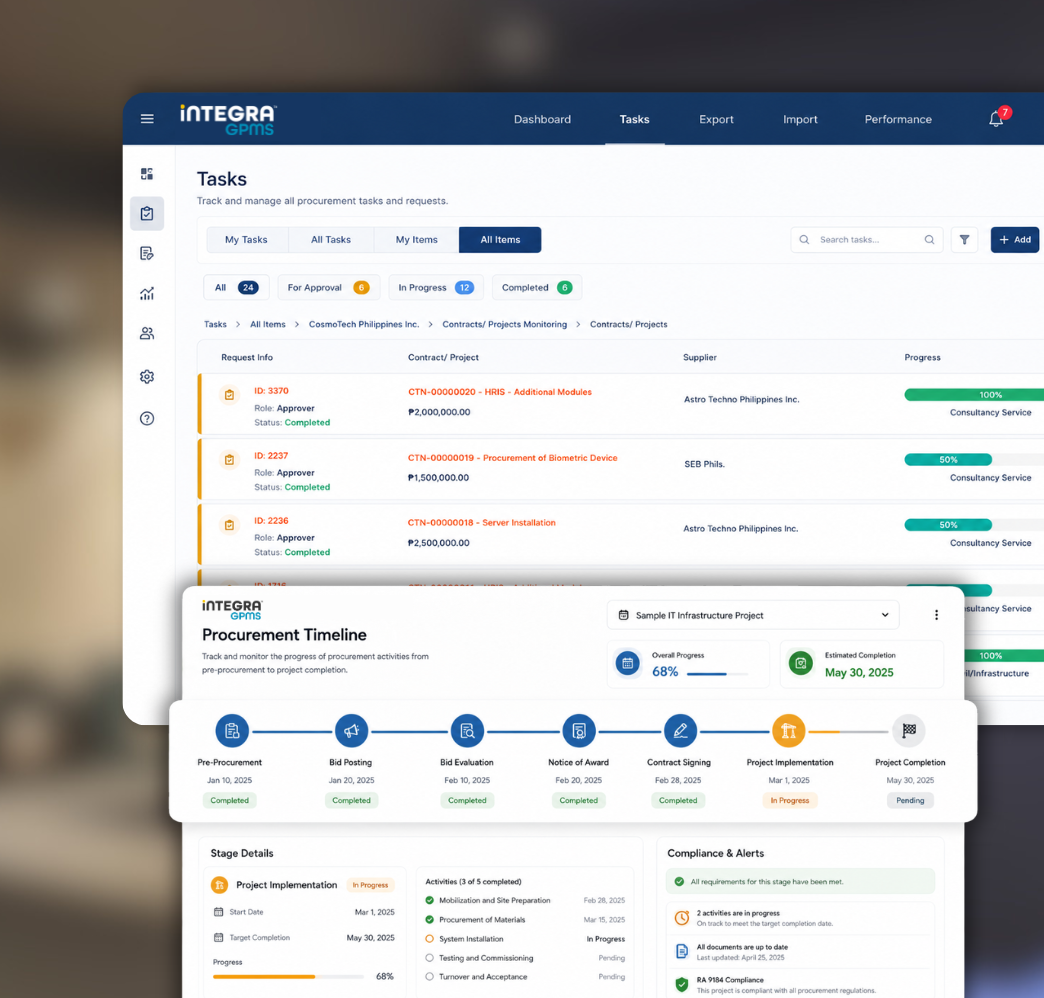
Cosmotech GPMS supports the full procurement process, from pre-procurement planning through project implementation and completion. Users can track documents, activities, approvals, contracts, and reports without juggling spreadsheets, shared drives, or paper files.
The system is designed to support the detailed reporting and monitoring requirements of the Philippine Government Procurement Reform Act (RA 9184) and RA 12009.
Modes of procurement supported
Public Bidding
Alternative Methods
Small Value Procurement
Shopping
Repeat Order
Limited Source Bidding
Negotiation
Core benefits
Why agencies choose GPMS
Six ways GPMS makes procurement work easier for your office.
Centralized procurement management
Manage procurement data, documents, requests, approvals, contracts, payments, and reports in one system.
Faster approval tracking
Track purchase requests and procurement approvals anytime, with workflow support for approvals and disapprovals.
Document archiving per project
Attach and archive scanned documents per project, making them searchable and downloadable anytime.
Automated notifications and alerts
Send reminders for procurement deadlines, invitations to bid, notices of award, and other procurement-related actions.
Procurement compliance support
Generate documents and reports aligned with RA 9184 and other procurement monitoring requirements.
Secure access and audit trail
Control user access through role-based permissions and maintain an audit trail of system actions.
Main modules
Built around the full procurement process
GPMS is organized into modules that cover every stage of the procurement process.
References
Maintain reference tables for commonly used procurement data: items and services, groups, vendors, bidders, modes of procurement, types of procurement, and sources of funds.
PPMP and APP
Record, submit, and approve the Project Procurement Management Plan per department. Consolidate approved PPMPs into the Annual Procurement Plan and generate procurement reports by department, mode of procurement, or type of procurement.
Purchase Request
Manage the submission and approval of purchase requests per department, with request tracking, approval workflow, disapproval tracking, and email notifications.
Procurement Activities Monitoring
Generate forms and monitor procurement activities based on the selected mode of procurement, including schedules, timelines, activity updates, bidders, notices, and outcomes.
Contracts and Project Implementation
Monitor contract details, project implementation status, and completion progress. Track contract information, suppliers, due dates, contract price, liquidated damages, performance bonds, warranty details, and other contract documents.
Billing and Payments
Record payment terms, contract prices, due dates, computed amounts, Statements of Account, vouchers, OR/reference numbers, and total amounts paid per contract.
Dashboard
View summarized information for planning, monitoring, and decision-making, including completed projects, awarded contracts, expiring contracts, deliverables, PPMPs, purchase requests, and contracts with open balances.
Reports and Forms Generation
Generate procurement reports, monitoring reports, compliance reports, contract summaries, forms, notices, and other required documents.
Feature deep dive
A closer look at what GPMS can do
End-to-end procurement tracking
GPMS tracks the full procurement lifecycle, from pre-procurement planning to procurement activities, project implementation, contract monitoring, billing, and completion.
Track procurement activities across all stages
Monitor project status in real time
View activity progress through dashboards and reports
Keep procurement documents organized by project
Record timelines and action history for transparency
PPMP and APP management
The PPMP and APP module lets departments prepare, submit, and approve procurement plans.
Encode procurement projects per department
Track approval of PPMPs
Consolidate approved PPMPs into the Annual Procurement Plan
Generate annual procurement reports
Link approved budget per project and department
Send email notifications during approval workflows
Purchase request management
GPMS provides a workflow for managing purchase requests from submission to approval.
Submit purchase requests per department
Track pending, approved, and disapproved requests
Receive email notifications for request updates
Approve or disapprove purchase requests anytime
Monitor purchase request progress through dashboards
Procurement activities monitoring
Monitor procurement activities with pre-determined schedules, action periods, and activity timelines based on the mode of procurement.
Invitation to Bid
Bid Bulletin
Abstract of Bids
Notice of Award
Notice to Proceed
Post-Qualification
Submission of Additional Documents
Contract preparation and signing
Supplier and bidder monitoring
Contract and project implementation monitoring
Track detailed contract information, suppliers, implementation status, and project completion.
Contract number, date, and due date
Company or supplier name and contact details
Contract deliverables and project description
Contract price and performance bond details
Contract status and implementation status
Liquidated damages and warranty information
Summary reports for expiring, multi-year, consultancy, infrastructure, and goods contracts
Billing and payments
Record and monitor payment details for contracts and projects.
Payment terms and contract price
Payment due date and computed amount due
Statement of Account and printed vouchers
Amount paid per contract and OR/reference number
Total paid amount per contract
Dashboard and business intelligence
The GPMS dashboard summarizes procurement information for monitoring and decision-making.
Total completed projects for the year, per month
Total awarded contracts and expiring contracts
Deliverables for the period
PPMPs for purchase request and PPMPs with contract
Procurement activity status
Graphical reports and charts
Security and audit trail
GPMS includes security controls based on user roles, access rights, and permissions.
Role-based access control
User permission management
Audit trail of user actions
Record history showing before-and-after changes
Identification of action makers
Special features
Built for Philippine government procurement
Capabilities designed around how Philippine agencies actually work.
Complete bidding documents based on RA 9184
Centralized document location per project
End-to-end project tracking and monitoring
Business intelligence for quick procurement insights
Graphical monitoring of activity status
Posting capability to PhilGEPS
Workflow for request monitoring and approval
Recorded time duration per request approval stage
Pre-determined procurement activity timelines
Email sending of procurement notices
Graphical representation of project activity status
Optional integration with Budget System, ERP Financial System, and PhilGEPS
Reports & forms
Reports and forms you can generate
GPMS can generate the procurement reports and forms your office needs for compliance and day-to-day operations.
Reports
GPMS can generate procurement and contract reports, including:
Procurement Monitoring Report for all projects, items procured, and classified procurement modes
Consolidated Procurement Monitoring Report
Annual Agency Procurement Compliance and Performance Indicator report
Projects with failed bids or cancelled projects, with reasons
Contracts issued to suppliers with no deliveries yet
Delivered items not yet paid
Expiring contracts with time limits set
Total number and amount of alternative methods per mode
Summary of issued purchase orders and job orders per contract
Summary of disbursement vouchers per purchase order or job order
Total number of suppliers invited per canvass
Total number of contracts awarded
Summary of items purchased through RF per account code
List of contracts per category
Infrastructure and consultancy summaries
Summary of multi-year contracts
Summary of one-year contracts
Contracts with partial or complete delivery
Pending transactions
Summary of public bidding
Summary of shopping above ₱50,000 and other shopping
Summary of direct contracting
Summary of repeat orders
Summary of limited source bidding
Summary of negotiation modes
Contracts about to expire
Suppliers with liquidated damages
Contracts with penalties
Performance evaluation summaries
Retention fees deducted
Performance bond refunds
Forms
GPMS can generate common procurement forms, including:
Invitation to Bid
Bid Bulletin
Abstract of Bids
Notice for Submission of Additional Documents
Notice of Award
Notice of the Bidding Results to Bidders
Notice of Post Disqualification
Notice to Proceed
Canvass Form and Summary of Canvass
Referrals to proponents or end-users for evaluation
BAC Referral Form
Job Order / Letter Order / Purchase Order Form
Certificate of Sealed Canvass for Opening
Certificate of Submitted Quotation
Requisition and Issue Voucher Form
Voucher for Revolving Fund
Disbursement Voucher
Delivery Penalty Computation
Supplier / Contractor / Consultant Performance Evaluation Form
Document uploads
Attach and archive every procurement document
GPMS lets users upload and attach project documents so everything stays linked to its project and searchable during audits.
Document types supported
Invitation to Bid
Advertisement in newspaper
Abstract of Bids
Bid Evaluation Report by TWG
Post-Qualification Report by TWG
Letters and communications to and from bidders
Minutes of meetings
Contracts or agreements
Disbursement Voucher
Other supporting documents
Compliance
Built for Philippine procurement law
GPMS is designed to align with the requirements of the following:
Republic of the Philippines Government Procurement Policy Board
Philippine Government Procurement Reform Act (RA 9184)
Philippine Government Procurement Reform Act (RA 12009)
FAQ
Questions, answered.
Is GPMS compliant with RA 9184 and RA 12009?
Yes. GPMS is designed to support the reporting and monitoring requirements of the Philippine Government Procurement Reform Act (RA 9184) and RA 12009. The system can generate bidding documents and procurement reports aligned with these laws.
Does GPMS integrate with PhilGEPS?
Yes. GPMS includes posting capability to the Philippine Government Electronic Procurement System (PhilGEPS). Optional integration is also available with Budget Systems and ERP Financial Systems.
Which modes of procurement does GPMS support?
GPMS supports Public Bidding, Alternative Methods, Small Value Procurement, Shopping, Repeat Order, Limited Source Bidding, and Negotiation.
Can GPMS generate BAC forms and procurement notices?
Yes. The system can generate common procurement forms including the Invitation to Bid, Bid Bulletin, Abstract of Bids, Notice of Award, Notice to Proceed, BAC Referral Form, Canvass Form, Purchase Order, Disbursement Voucher, and supplier performance evaluation forms.
What does the GPMS dashboard show?
The dashboard provides summarized procurement information for planning and decision-making, including completed projects, awarded contracts, expiring contracts, deliverables, PPMPs for purchase request, PPMPs with contract, and procurement activity status.
Is GPMS secure for handling government procurement data?
GPMS includes role-based access control, user permission management, and a full audit trail of system actions. Record history shows before-and-after changes and identifies the user who made each action.
How does GPMS handle document archiving?
Scanned documents can be attached and archived per project, making them searchable and downloadable anytime. Supported uploads include the Invitation to Bid, Abstract of Bids, Bid Evaluation Report, Post-Qualification Report, contracts, disbursement vouchers, and other supporting documents.
Get started
Modernize your government procurement workflow
Cosmotech GPMS helps agencies improve procurement visibility, reduce manual tracking, support compliance, and manage the full procurement lifecycle in one system.